How Boreal Works: Your Money, Explained in Plain Language
Boreal connects securely to your Canadian bank accounts and turns your real spending into plain-language insights — no manual categorizing, no spreadsheets. Here's exactly how it works, step by step.
On this page
Most money apps hand you a pile of charts and expect you to do the interpreting. Boreal is built around the opposite idea: you should be able to open the app and immediately understand what's happening with your money — in a sentence, not a spreadsheet.
Here's how Boreal actually works, from the moment you connect an account to the insights you get each month.
Step 1: Connect your bank securely
Boreal links to your Canadian bank accounts through Plaid, the same secure connection layer used by many of Canada's largest fintech apps. You log in through your bank's own portal — Boreal never sees or stores your banking password.
Once connected, Boreal can read your transactions to understand your spending. A few things it deliberately does not do:
- It never stores your bank credentials.
- It can't move money or make payments — it's read-only.
- It never sells your data.
Your banking login stays between you and your bank. Boreal only receives a secure, read-only view of your transactions
Step 2: Boreal organizes your spending automatically
As soon as your transactions come in, Boreal categorizes them for you — groceries, dining, transport, subscriptions, and so on. There's no manual tagging and no rules to set up.
This is the part that kills most people's budgeting habit: the upkeep. Boreal removes it. Your spending is organized the moment it happens.
Step 3: Get plain-language insights
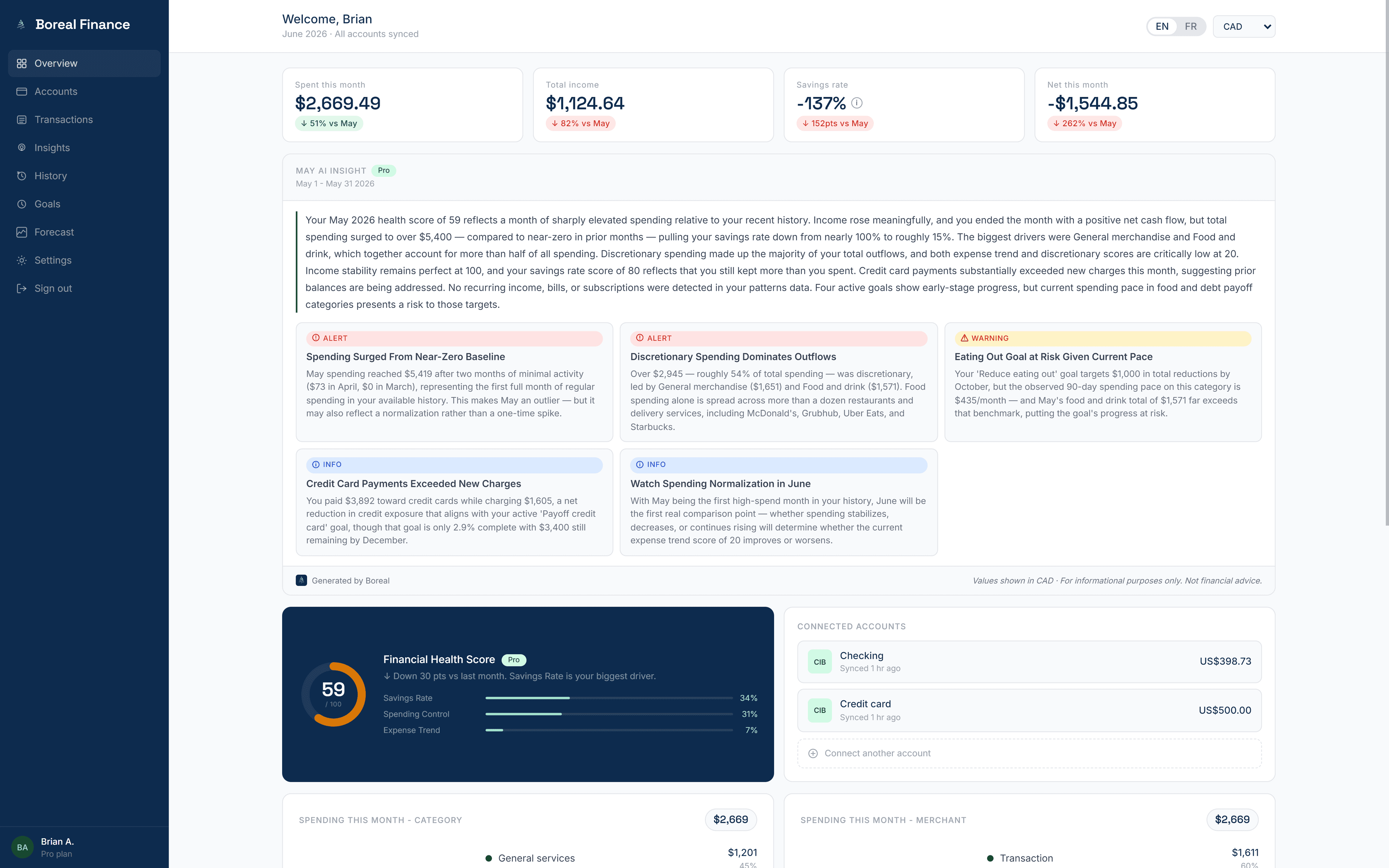
This is the core of Boreal. Instead of leaving you to interpret charts, Boreal reads your patterns and tells you what's worth knowing in plain words. For example:
- "Your dining spend is up 22% this month, mostly from weekend delivery."
- "Three subscriptions renewed this week totaling $58."
- "You're on track to finish the month about $140 ahead of last month."
The goal is a "so what" you can act on, not just a number you have to decode.
Free vs. Pro insights
On the free tier, Boreal keeps your spending organized and provides you with your first insight to get started. Boreal Pro adds deeper, more frequent insights and richer summaries that look further across your patterns and history.
Step 4: Make a decision, not a chart
Everything above rolls up to one purpose: helping you make a decision. Whether that's cancelling a subscription you forgot about, easing off a category that's creeping up, or simply confirming you're fine this month — Boreal is built to get you to that answer faster.
Is Boreal right for you?
Boreal is a good fit if you want to understand your money without becoming a part-time bookkeeper. It's especially useful if you've tried budgeting apps before and quietly abandoned them because the manual upkeep wore you down.
If you want total line-by-line control over every dollar, a hands-on envelope system might suit you better — but for most people who just want clarity and a nudge when something changes, that's exactly what Boreal is designed for.
Frequently asked questions
How does Boreal connect to my bank?
Boreal connects through Plaid, a secure service used by many major Canadian fintech apps. You log in through your bank's own portal, so Boreal never sees or stores your banking password. The connection is read-only — Boreal can view transactions but cannot move money.
Is Boreal safe to use?
Yes. Boreal uses a secure, read-only bank connection, never stores your banking credentials, and never sells your data. It can read your transactions to generate insights, but it cannot make payments or transfers.
Do I have to categorize my transactions manually?
No. Boreal categorizes your spending automatically as transactions come in, so there's no manual tagging, rules, or upkeep. This is one of the main reasons people stick with Boreal when other budgeting apps didn't last.
What's the difference between Boreal free and Boreal Pro?
The free tier keeps your spending organized and gives you your first monthly insight. Boreal Pro adds deeper, more frequent insights and richer summaries that draw on more of your history and patterns.
Which banks does Boreal support in Canada?
Boreal supports major Canadian banks and many credit unions through its secure Plaid connection. If your institution is supported by Plaid in Canada, you can connect it to Boreal.
Tags
Take control of your money
Boreal turns your accounts into clear, AI-powered insights. Join the early access.
Related posts
How Automatic Transaction Categorization Works — and Why Transfers Get Counted Wrong
Every app that connects to your bank promises to sort your spending for you. Most of them get the ordinary purchases right and then quietly ruin your totals with transfers, credit card payments, refunds, and savings contributions. Here's how automatic categorization actually works, exactly where it breaks, and how to tell whether your numbers can be trusted.
Is It Safe to Connect Your Bank Account to a Budgeting App in Canada?
Connecting your bank account to a budgeting app feels like a leap of faith. Here's a plain-language look at what Plaid actually does, the difference between OAuth and credential-based connections, what "read-only" really means, exactly what Boreal receives — and how to revoke access at any time.
How to Predict Your Bank Balance at the End of the Month
Your balance today doesn't tell you whether you'll make it to payday. Here's how to predict your bank balance at the end of the month using the bills, income and everyday spending you already have — including a simple worked example, and how an app can project your cash and warn you before you dip.