Is It Safe to Connect Your Bank Account to a Budgeting App in Canada?
Connecting your bank account to a budgeting app feels like a leap of faith. Here's a plain-language look at what Plaid actually does, the difference between OAuth and credential-based connections, what "read-only" really means, exactly what Boreal receives — and how to revoke access at any time.
On this page
If you've hesitated over the "Connect your bank" button in a budgeting app, that hesitation is reasonable. You're being asked to give a company you just met a window into the account that holds your rent money. It's fair to want to know exactly what's on the other side of that button before you press it.
This guide answers that plainly. It covers what Plaid actually does, the two different ways a connection can be made and why the difference matters, what "read-only" means in practice, precisely what Boreal receives and what it cannot do, and how to revoke access whenever you want. Where something depends on your own bank rather than on us, we'll say so — because a few of the most important answers live in your banking agreement, not ours.
What connecting your bank account actually does
When you connect an account, you are not handing over your bank account. You're authorizing a one-way flow of information: your financial institution (or a service acting on your instruction) releases a copy of certain account details and transaction history to the app you chose.
Three things are worth separating in your head, because they get blurred together in most people's worry:
- Access to information — someone can see your balances and transactions.
- Access to funds — someone can move money out of your account.
- Access to your identity at the bank — someone holds the credentials that let them act as you.
A budgeting app connection is designed to be the first of these only. The rest of this guide is really about how you verify that for yourself rather than taking anyone's word for it.
What Plaid does, and what it doesn't
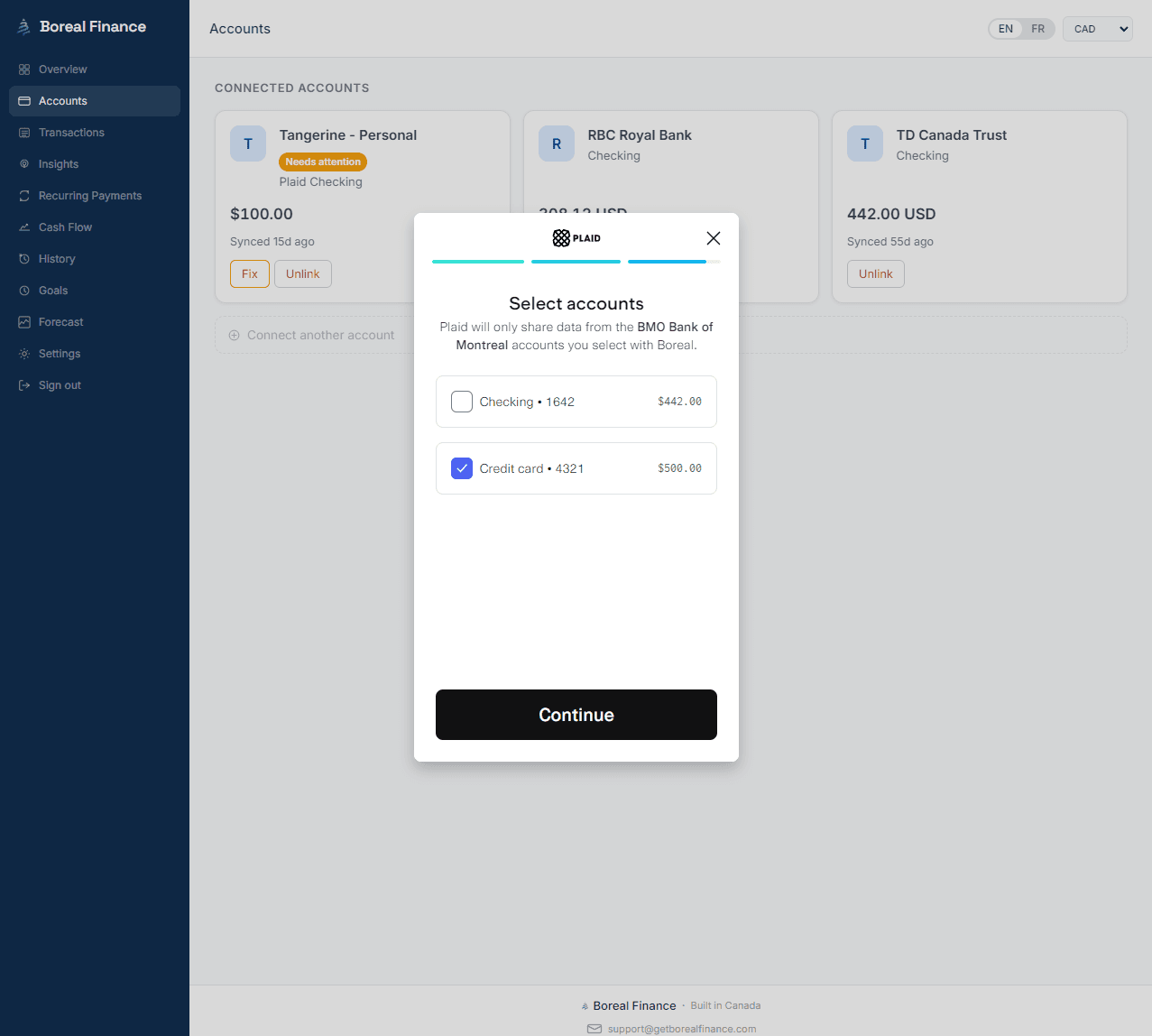
Plaid is the connection layer between financial apps and financial institutions. It's used by a large share of the fintech apps you've heard of, in Canada and elsewhere. When you connect a bank account in Boreal, you're going through Plaid's connection flow — the screen where you pick your institution, authenticate, and choose which accounts to share.
Plaid's role is narrow: establish the connection you authorized, retrieve the account and transaction data the app requested, and pass it to that app. Plaid states that users control which information is shared, and that it does not sell or rent users' financial information.
Two practical implications people miss:
- Plaid is a separate party with its own privacy policy and its own controls. Your data relationship is with both the app and Plaid, not just the app. Plaid publishes a portal (Plaid Portal) where you can see which apps you've connected and manage or disconnect them directly.
- The app only receives what it asked for. An app requests specific data products — transactions, balances, account details. It doesn't get a general-purpose key to your bank.
So on the narrow question is Plaid safe — the honest framing is that Plaid is a regulated, widely audited intermediary whose whole business depends on not mishandling this data, and it gives you tools to see and revoke what you've connected. That's meaningfully better than a spreadsheet where you paste your own statements, and it is not the same thing as zero risk. Any system that moves data has a risk surface. What you're deciding is whether the controls are reasonable and whether you can undo it.
You are authorizing a copy of your transaction history to flow one way. You are not authorizing anyone to move your money.
OAuth vs. credential-based connections: the difference that matters most
This is the single most important distinction in this article, and almost nobody explains it before asking you to connect.
OAuth connections (the good pattern)
In an OAuth connection, you're redirected to your own bank's login page or app. You authenticate there, with your bank, on your bank's domain. Your bank then issues a token that grants the app access to specific data — and neither Boreal nor Plaid ever receives your banking username or password, because you never typed it anywhere but at your bank.
This pattern also gives you a second revocation point: because your bank issued the token, your bank can usually show you the connection and let you cancel it from your own online banking settings.
Credential-based connections (the older pattern)
Where an institution doesn't yet support OAuth, the older approach is credential-based: you enter your online banking username and password into Plaid's connection screen, and Plaid uses those credentials to retrieve your data on your behalf. Plaid may store them, encrypted, so the connection can keep refreshing without asking you to log in every time.
Here's the part to be clear-eyed about: in this pattern, your credentials are held by an intermediary. Boreal still never receives them — they don't reach us in either pattern — but "nobody has them" isn't accurate for credential-based connections the way it is for OAuth. That's the real trade-off, and it's the reason the industry is moving to OAuth.
Which one you'll get
That depends on your institution, not on Boreal. Canadian banks have been rolling out OAuth-style connections progressively, and coverage changes over time. The easiest way to know is to watch the screen: if you're sent to your bank's own login page and land back in the app afterward, that's OAuth. If you type your banking credentials into a form inside the connection window, it's credential-based.
If your bank offers OAuth and you're given the choice, take it.
What "read-only bank account access" means in Canada
"Read-only" isn't marketing language — it describes which capabilities were requested when the connection was established.
Financial data providers expose different products. Some are about reading information: transaction history, balances, account details, identity data. Others are about initiating movement: payments, transfers, direct debit setup. Those are separate products with separate permissions, and an app that never requests the movement products has no mechanism to move your money, no matter what its code says.
That's the concrete answer to can a budgeting app move my money: not if it holds read-only access. There's no hidden button. The capability was never granted.
Two honest caveats, because you should be able to check rather than trust:
- Read-only is about capability, not about how careful the company is with the data it reads. Your transaction history is sensitive on its own. Where it's stored, who can see it, and how long it's kept all still matter.
- Verify what a given app requested. The consent screen tells you what's being shared. Read it once instead of clicking through — it's the only moment where all of this is stated plainly.
What Boreal actually receives
Concretely, when you connect an account to Boreal, we receive:
- Account metadata — institution name, account name, account type and subtype, currency, and the masked last digits. Not your full account number.
- Balances — current and available balances for the accounts you chose to share.
- Transactions — date, description, amount, merchant, and category, so Boreal can organize your spending and detect recurring charges.
- Derived data we generate ourselves — monthly summaries, category totals, trends, detected recurring streams, and the plain-language insights Boreal writes from them.
And on the handling side: data moves over encrypted connections, sensitive financial fields are encrypted at rest in our database, the access token that maintains your connection is stored server-side only and is never exposed to your browser, and access to production systems is restricted to authorized systems and personnel. We don't sell your data. You can read the specifics on our security and privacy pages, which are the authoritative versions of these statements.
What Boreal cannot do
This list is deliberately blunt, because the absence of a capability is the actual reassurance:
- Boreal cannot move money. No transfers, no payments, no bill payments, no withdrawals. Boreal doesn't hold payment-initiation access to your accounts.
- Boreal never sees or stores your banking password. You authenticate with your bank or through Plaid's connection flow; your credentials don't reach Boreal in either pattern.
- Boreal cannot open, close, or change anything at your bank. It has no ability to act on your account.
- Boreal doesn't sell your financial data.
If you want the fuller picture of what happens after the data arrives — categorization, insights, what's generated and when — that's covered in how Boreal works.
Bank account aggregator security in Canada: what to check before you connect
Whatever app you're evaluating — us or anyone else — these are the questions worth asking. They're all answerable in a few minutes from a company's own site.
- Does it use read-only access, and does it say so specifically? Vague "bank-level security" copy isn't an answer. Look for an explicit statement about what the app can and cannot do.
- Does it publish a real security page and privacy policy? Not a paragraph in the footer — actual documentation of how data is protected, who can access it, and how long it's kept.
- Can you disconnect and delete, self-serve? An app that makes you email support to disconnect is telling you something.
- Is it clear about the data it retains after you disconnect? Most apps keep previously imported data unless you ask for deletion. That should be stated, not discovered.
- Does it explain the third parties involved? Plaid, hosting, payment processing. If the chain isn't disclosed, you can't evaluate it.
- Is there a way to report a security issue? A published security contact is a small signal that someone is responsible for this.
Applying that to budgeting apps in Canada generally: the well-built ones will pass all six easily, and the checklist is more useful than any single company's reassurance — including ours.
PIPEDA and your privacy rights in Canada
Connecting your bank account doesn't put you outside the law. In Canada, private-sector organizations that handle your personal information are generally governed by PIPEDA — the Personal Information Protection and Electronic Documents Act — or by a substantially similar provincial law (Quebec, Alberta, and British Columbia each have their own regimes; Quebec's Law 25 in particular strengthened consent and deletion rights).
Broadly, these laws mean an organization handling your financial data must:
- Obtain meaningful consent for collecting, using, and disclosing your personal information.
- Limit collection to what's needed for the stated purpose, and use it only for that purpose.
- Protect it with safeguards appropriate to its sensitivity — and financial data sits at the sensitive end.
- Let you access the personal information held about you and request corrections.
- Be accountable, with someone responsible for compliance and a way to raise a complaint.
If you believe an organization has mishandled your information, you can complain to the Office of the Privacy Commissioner of Canada (or your provincial regulator, where a provincial law applies). That's a genuine backstop — the point of mentioning it isn't legal detail for its own sake, but that a PIPEDA budgeting app operating in Canada is accountable to something external, not only to its own promises.
How to revoke access, in three places
You should know the exit before you take the entrance. There are three independent places to cut a connection, and using more than one is reasonable.
1. Disconnect in Boreal
Disconnect the account in Boreal. Syncing stops from that connection, and the associated access token is deleted or disabled. One thing to be explicit about: data already imported stays in your Boreal account unless you ask for it to be deleted. If you want it gone, you can request deletion of that historical data, or delete your Boreal account entirely — at which point profile data, connected-account records, tokens, transactions, summaries and insights are deleted or anonymized, subject to the limited legal and security exceptions in our retention policy.
2. Revoke in Plaid Portal
Plaid maintains a portal where you can see the apps you've connected through Plaid and disconnect them there, independent of the app. This is useful if you've lost track of connections over the years, or if an app has stopped working and you can't get to its settings.
3. Revoke at your bank
If your connection was made through OAuth, your bank issued the token — so your bank can usually revoke it. Look for a "third-party access," "connected apps," or "data sharing" section in your online banking. This is the strongest revocation because it's enforced at the source.
Deleting an app from your phone is not revoking access. The connection lives on the server side, not in the app icon.
Why you should read your own bank agreement
This is the part most articles skip, and it's the part where the answer genuinely isn't ours to give.
Your online banking agreement sets out your obligations around protecting your credentials — and in some agreements, the protections you get against unauthorized transactions can be affected by whether you shared your login information with a third party. Because credential-based connections involve exactly that, this is not a hypothetical distinction.
So before you connect anything, spend ten minutes with your own agreement:
- Search it for terms like "third party," "aggregator," "credentials," and "unauthorized."
- Note whether your bank offers an approved data-sharing method (an OAuth connection is usually that method).
- If your bank's own documentation says which apps or providers it supports, that's the most authoritative source you have.
We can tell you what Boreal does and doesn't do. We can't tell you what your bank's agreement says about your liability — and any company that waves that question away is being careless with a question that's actually yours.
The bottom line
Is it safe to connect your bank account to a budgeting app? The useful version of that question is: what am I granting, to whom, and can I take it back?
For a read-only connection through Plaid, the answer is: you're granting a copy of your transaction and balance data, to the app plus the connection provider, and you can revoke it in the app, in Plaid Portal, and — with OAuth — at your bank. Boreal receives your transactions and balances, encrypts them, uses them to organize your spending and write plain-language insights, and cannot move a dollar of your money in any direction.
That's a real trade, not a free lunch. You're exchanging some data exposure for not having to maintain your finances by hand. Plenty of people make that trade rationally, and some reasonably decide not to. If you do connect, prefer OAuth where your bank offers it, read the consent screen once rather than clicking through, and know where the disconnect button is. If you're connecting several accounts across different institutions, our guide to tracking spending across multiple bank accounts covers what that looks like day to day.
Frequently asked questions
Is Plaid safe to use in Canada?
Plaid is the connection layer used by many major financial apps in Canada and internationally to link bank accounts securely. It states that users control which information is shared and that it does not sell or rent users' financial information, and it provides Plaid Portal so you can see and disconnect the apps you've connected. No data connection is zero-risk, but the meaningful controls are in place: you choose which accounts to share, apps receive only the data products they requested, and you can revoke access at any time — in the app, in Plaid Portal, or at your bank if the connection was made through OAuth.
Can a budgeting app move my money?
Not if it holds read-only access. Reading data and initiating payments are separate permissions, and an app that never requested payment-initiation access has no mechanism to move funds — there is no hidden capability to enable. Boreal's connection is read-only: it can see transactions and balances to organize your spending, and it cannot transfer, withdraw, or pay anything from your accounts.
Does Boreal see my banking password?
No. Boreal never receives, sees, or stores your online banking username or password. With an OAuth connection you authenticate on your own bank's login page, so no intermediary receives your credentials at all. With an older credential-based connection you enter them into Plaid's connection screen and Plaid uses them to retrieve your data on your behalf — they still never reach Boreal. If your bank offers OAuth, prefer it.
What is the difference between an OAuth and a credential-based bank connection?
With OAuth, you're redirected to your own bank to log in, and the bank issues a scoped token to the app — nobody but your bank ever handles your credentials, and you can usually revoke the connection from your online banking. With a credential-based connection, you enter your banking username and password into the connection provider's screen, and the provider uses them (typically stored encrypted) to retrieve your data. OAuth is the stronger pattern, and which one you get depends on your financial institution rather than on the app.
What data does Boreal receive when I connect an account?
Boreal receives account metadata (institution, account name, type, currency, and the masked last digits — not your full account number), current and available balances, and transaction records including date, description, amount, merchant and category. From those, Boreal generates its own derived data: monthly summaries, category totals, detected recurring charges, and plain-language insights. Data is transmitted over encrypted connections, sensitive financial fields are encrypted at rest, and the access token that maintains your connection is stored server-side only.
How do I revoke a budgeting app's access to my bank account?
There are three independent places. Disconnect the account inside the app — in Boreal, syncing stops and the access token is deleted or disabled. Revoke the connection in Plaid Portal, which works independently of the app. And if the connection was made through OAuth, revoke it in your own online banking under third-party or connected-app access, which is the strongest option because it's enforced at your bank. Deleting the app from your phone does not revoke anything.
What happens to my data after I disconnect?
Disconnecting stops new data from syncing, but previously imported data generally remains in your account so your history stays intact — unless you ask for it to be removed. You can request deletion of the historical data tied to a disconnected account, or delete your Boreal account entirely, in which case profile information, connected-account records, access tokens, transactions, summaries and insights are deleted or anonymized. Limited exceptions apply where retention is required for legal, tax, security, or dispute-resolution purposes, and deleted data may persist in encrypted backups until normal backup rotation clears it.
Does PIPEDA apply to budgeting apps in Canada?
Generally yes. PIPEDA — the Personal Information Protection and Electronic Documents Act — governs how private-sector organizations in Canada collect, use, and disclose personal information, with substantially similar provincial laws in Quebec, Alberta, and British Columbia applying in place of it in some cases. In practice that means an app handling your financial data needs meaningful consent, must limit collection to its stated purpose, must apply safeguards appropriate to sensitive data, and must let you access and correct the information held about you. If you believe your information has been mishandled, you can complain to the Office of the Privacy Commissioner of Canada or your provincial regulator.
Tags
Take control of your money
Boreal turns your accounts into clear, AI-powered insights. Join the early access.
Related posts
How Automatic Transaction Categorization Works — and Why Transfers Get Counted Wrong
Every app that connects to your bank promises to sort your spending for you. Most of them get the ordinary purchases right and then quietly ruin your totals with transfers, credit card payments, refunds, and savings contributions. Here's how automatic categorization actually works, exactly where it breaks, and how to tell whether your numbers can be trusted.
How to Predict Your Bank Balance at the End of the Month
Your balance today doesn't tell you whether you'll make it to payday. Here's how to predict your bank balance at the end of the month using the bills, income and everyday spending you already have — including a simple worked example, and how an app can project your cash and warn you before you dip.
How to Track Your Spending Without Making a Budget
Not everyone wants to build a budget — and you don't have to. If your goal is to understand where your money goes and avoid surprises, here's how to track spending without budgeting: no categories to set up, no transactions to sort, no spreadsheet to babysit.