How to Track Your Spending Without Making a Budget
Not everyone wants to build a budget — and you don't have to. If your goal is to understand where your money goes and avoid surprises, here's how to track spending without budgeting: no categories to set up, no transactions to sort, no spreadsheet to babysit.
On this page
There's a quiet assumption baked into most personal-finance advice: that being good with money means building a budget. Set your categories, assign every dollar, track against the plan, repeat forever. For some people that works beautifully. For a lot of others, it's the exact reason they've given up on money apps three times already.
Here's the part nobody says out loud: you can track spending without budgeting. If your real goal is to understand where your money goes and stop getting blindsided — not to run a spreadsheet — a budget is optional. This guide is for the people who searched for a budgeting app and then realized they don't actually want to budget. They want visibility.
Wanting to track spending isn't the same as wanting to budget
It's worth separating two things that usually get lumped together:
- Budgeting is planning — deciding in advance how much you'll spend in each category and holding yourself to it.
- Tracking is understanding — seeing what you actually spent, where it went, and what changed.
You can do the second without the first. Plenty of people don't need a spending cap on "dining"; they just want to know when dining quietly doubled. That's not a budgeting problem — it's a visibility problem, and it has a much lighter solution.
If you've ever thought "I don't want a budget, I just want to know where my money's going," you're not doing personal finance wrong. You're describing a different job, and a no budget money management app is built for that job specifically.
Why traditional category budgeting doesn't stick for everyone
To be fair: category budgeting is genuinely valuable for some people. If you're paying down debt on a tight timeline, or you tend to overspend without a hard limit, a zero-based or 50/30/20 budget gives you guardrails that work.
But for someone whose main goal is awareness, the same system adds friction that rarely survives contact with real life:
- Setup is a project. You have to define categories, set amounts, and decide where every merchant belongs before you've learned anything.
- Upkeep is constant. Budgets depend on you sorting transactions and reconciling the plan every week.
- The guilt loop. Blowing a category turns a neutral fact ("I spent more on groceries") into a small failure, and failure is what makes people close the app.
None of that is a character flaw. It's just the wrong tool if what you wanted was a clear read on your money, not a spending contract with yourself.
What tracking without a budget actually looks like
So what replaces the budget? Automatic spending visibility. Instead of a plan you maintain, you get a picture that maintains itself. In practice, a good automatic spending tracker in Canada does three things:
- Connects to your accounts and pulls transactions on its own — no exporting, no manual entry, no re-typing.
- Sorts spending for you — you don't build categories or tag anything; the app handles it in the background.
- Tells you what changed — a plain-language heads-up when something moved, like a category creeping up or a subscription renewing at a higher price.
The difference is the direction of the work. A budget asks you to do the work up front and keep doing it. A tracker does the work and hands you the conclusion. You're not managing a plan — you're just staying informed.
What to look for in a budgeting app for people who hate budgeting
If you're shopping for a budgeting app for people who hate budgeting, the features that matter are the ones that remove work, not add it. Look for:
- No manual entry. The app should sync transactions automatically. A budgeting app with no manual entry in Canada connects to your bank through open banking and pulls everything in — you should never be typing amounts.
- No mandatory categories. You should be able to get value on day one without a spending tracker without categories setup. Automatic sorting is fine; being forced to define and maintain categories is the friction you're trying to avoid.
- No spreadsheet, no charts to decode. The point is to manage money without a spreadsheet and without staring at a pie chart trying to interpret it. The best apps hand you a sentence, not homework.
- No zero-based budgeting requirement. A budget app without zero-based budgeting doesn't make you assign every dollar a job. It just shows you what happened and flags what's worth a look.
- Read-only and private. It should connect securely, in read-only mode, and never sell your data.
If an app's very first screen is "set up your budget," it's built for planners. If its first screen is "here's what's happening with your money," it's built for you.
How Boreal tracks spending without a budget
Boreal was designed around exactly this idea: understanding your money shouldn't require building a budget. There are no budgets to create, no transactions to sort, and no charts you're left to interpret yourself.
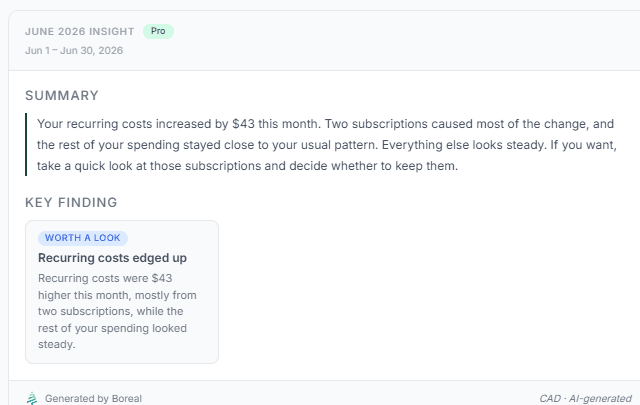
You connect your Canadian bank accounts once through Plaid — read-only, so Boreal can see your transactions but can never move money, and you log in through your bank's own portal so Boreal never sees your banking password. From there it categorizes your spending automatically and watches for what changed. Then, instead of another dashboard, it hands you a plain-language insight: something like "dining is up 22% this month, mostly weekend delivery." No category you set, no limit you have to police — just a clear read on what's actually happening. See how Boreal works.
Best for: People who want automatic spending visibility and early warning of surprises — without building or maintaining a budget.
When you might still want a real budget
This isn't an argument that budgets are bad. If any of these describe you, a traditional budget (or a dedicated budgeting tool) may serve you better than tracking alone:
- You're aggressively paying down debt and need a hard cap per category.
- You share finances and want an agreed plan, not just a shared view.
- You're saving toward a specific target and want every dollar assigned.
Even then, awareness comes first — you can't budget well for spending you don't understand. Many people start by simply tracking, learn their real patterns for a month or two, and only then decide whether a formal budget is worth the effort. If you do want to compare structured options, our roundup of the best budgeting apps in Canada covers those too.
The bottom line
You do not have to build a budget to be in control of your money. If your goal is understanding patterns and avoiding surprises, tracking is enough — and tracking done right means no categories to set up, no manual entry, and no spreadsheet to maintain. Let an app connect to your accounts, sort your spending, and tell you what changed in plain English. That's the whole point of a no budget money management app: the clarity of a budget without the chore of building one. If juggling accounts is part of the problem, here's how to track spending across multiple bank accounts the same low-effort way.
Frequently asked questions
Can I track my spending without making a budget?
Yes. Budgeting and tracking are two different things — budgeting is planning your spending in advance, while tracking is simply understanding what you actually spent. If your goal is visibility rather than a plan, you can track spending without budgeting by using an app that connects to your accounts, categorizes transactions automatically, and tells you what changed. Boreal is built for this: no budgets to create and no categories to set up.
What is the best money app for Canadians who hate budgeting?
The best option for people who dislike budgeting is an automatic spending tracker that does the work for you rather than asking you to build and maintain a budget. Look for no manual entry, no mandatory categories, and no spreadsheet — just automatic syncing and plain-language summaries of what changed. Boreal connects to your Canadian accounts through Plaid and gives you that visibility without a single budget to set up.
Is there a budgeting app with no manual entry in Canada?
Yes. Apps that connect through open banking providers like Plaid pull your transactions in automatically, so you never type in amounts or import spreadsheets. This is what a budgeting app with no manual entry in Canada means in practice — your accounts sync on their own and the app sorts and summarizes the spending for you. Boreal works this way and connects in secure, read-only mode.
Do I need to set up categories to track my spending?
No. A good spending tracker categorizes transactions automatically in the background, so you get useful insights on day one without defining or maintaining categories yourself. Automatic sorting gives you the benefit — seeing where money goes — without the upkeep of manual tagging. With Boreal there are no categories to set up and no transactions to sort.
How can I manage my money without a spreadsheet?
Use an app that connects to your bank accounts, tracks spending automatically, and surfaces what changed in plain language — replacing the manual export, re-typing, and formulas a spreadsheet requires. Instead of a grid you maintain, you get a sentence you can act on, like "groceries are up $80 this month." Boreal lets you manage money without a spreadsheet and without any charts you're left to interpret yourself.
Is tracking spending without a budget actually enough to stay on top of my money?
For many people, yes. If your main goals are understanding your patterns and catching surprises early — a subscription price increase, a category creeping up, an unusual charge — automatic tracking covers that without a formal budget. A budget adds value when you need hard spending limits, but awareness comes first, and tracking gives you that awareness with almost no effort.
Tags
Take control of your money
Boreal turns your accounts into clear, AI-powered insights. Join the early access.
Related posts
How Automatic Transaction Categorization Works — and Why Transfers Get Counted Wrong
Every app that connects to your bank promises to sort your spending for you. Most of them get the ordinary purchases right and then quietly ruin your totals with transfers, credit card payments, refunds, and savings contributions. Here's how automatic categorization actually works, exactly where it breaks, and how to tell whether your numbers can be trusted.
How to Predict Your Bank Balance at the End of the Month
Your balance today doesn't tell you whether you'll make it to payday. Here's how to predict your bank balance at the end of the month using the bills, income and everyday spending you already have — including a simple worked example, and how an app can project your cash and warn you before you dip.
AI Budgeting Apps in Canada: What AI Should Actually Do With Your Money
"AI budgeting app" can mean almost anything right now — from a chatbot repeating generic tips to software that actually reads your transactions. Here's how to tell the difference, and what an AI money app in Canada should really do for you.