How to Track Spending Across Multiple Bank Accounts in Canada Without a Spreadsheet
If your money is spread across RBC, TD, a couple of credit cards, and maybe a Wealthsimple account, tracking your real spending is painful. Here's how to see every account in one place in Canada without building (and babysitting) another spreadsheet.
On this page
Most Canadians don't keep their money in one place. There's a chequing account at one bank, savings at another, a credit card or two, and increasingly a Wealthsimple or EQ Bank account on top. That's normal — but it makes one simple question surprisingly hard to answer: how much am I actually spending?
This guide walks through how to track spending across multiple bank accounts in Canada, why the spreadsheet approach quietly falls apart, and how to see everything in one place without the manual upkeep.
Why tracking multiple accounts is so hard in Canada
When your spending is split across banks, no single bank app can show you the whole picture. Each one only knows about its own accounts. So you're left stitching the story together yourself:
- Your RBC app shows your RBC chequing and your RBC Visa.
- Your TD app shows your TD savings and maybe a line of credit.
- Your credit card portals each show one card, in isolation.
- Wealthsimple or EQ Bank shows yet another slice.
None of them add up your dining, groceries, or subscriptions across all of those accounts. So the only way to get a true total is to manually combine them — which is exactly why so many people reach for a spreadsheet.
Why the spreadsheet approach falls apart
A spreadsheet feels like the responsible choice, and for a month or two it works. The problem is that it depends entirely on you:
- You have to export or re-type transactions from every account, every month.
- You have to categorize each line by hand — was that $58 groceries or dining?
- You have to keep the formulas right as you add accounts or cards.
- You have to remember to do it at all, which is where most spreadsheets quietly die.
The spreadsheet isn't wrong — it's just high-maintenance. The moment you skip a week, the totals are stale, and a stale budget is one you stop trusting.
See all your bank accounts in one place
The better approach is to aggregate your accounts — connect them all to one app that pulls transactions automatically and combines them into a single view (see best budgeting apps in Canada). A Canadian bank account aggregator lets you:
- Combine RBC and TD accounts in one app, alongside any other bank.
- Track multiple credit cards in the same place as your chequing and savings.
- See spending across different banks added up by category, not siloed per institution.
- Skip the manual export entirely, because transactions sync on their own.
This is what turns "I think I'm spending too much on takeout" into "dining is $420 this month across all my cards" — a number you couldn't get from any single bank app.
How to do it securely (read-only, no shared passwords)
Connecting several accounts to one app is only a good idea if it's done safely. In Canada, the secure pattern looks like this:
- Use read-only connections via Plaid rather than apps that ask for your banking password directly. A read-only connection can see transactions but cannot move money.
- Confirm your banks are supported before you commit. Apps that connect through Plaid generally support the major Canadian banks and many credit unions.
- Check that your data isn't sold. A good app uses your data to help you, not to resell it.
If an app asks you to type your online-banking password directly into it, treat that as a red flag and walk away.
Doing it the no-upkeep way with Boreal
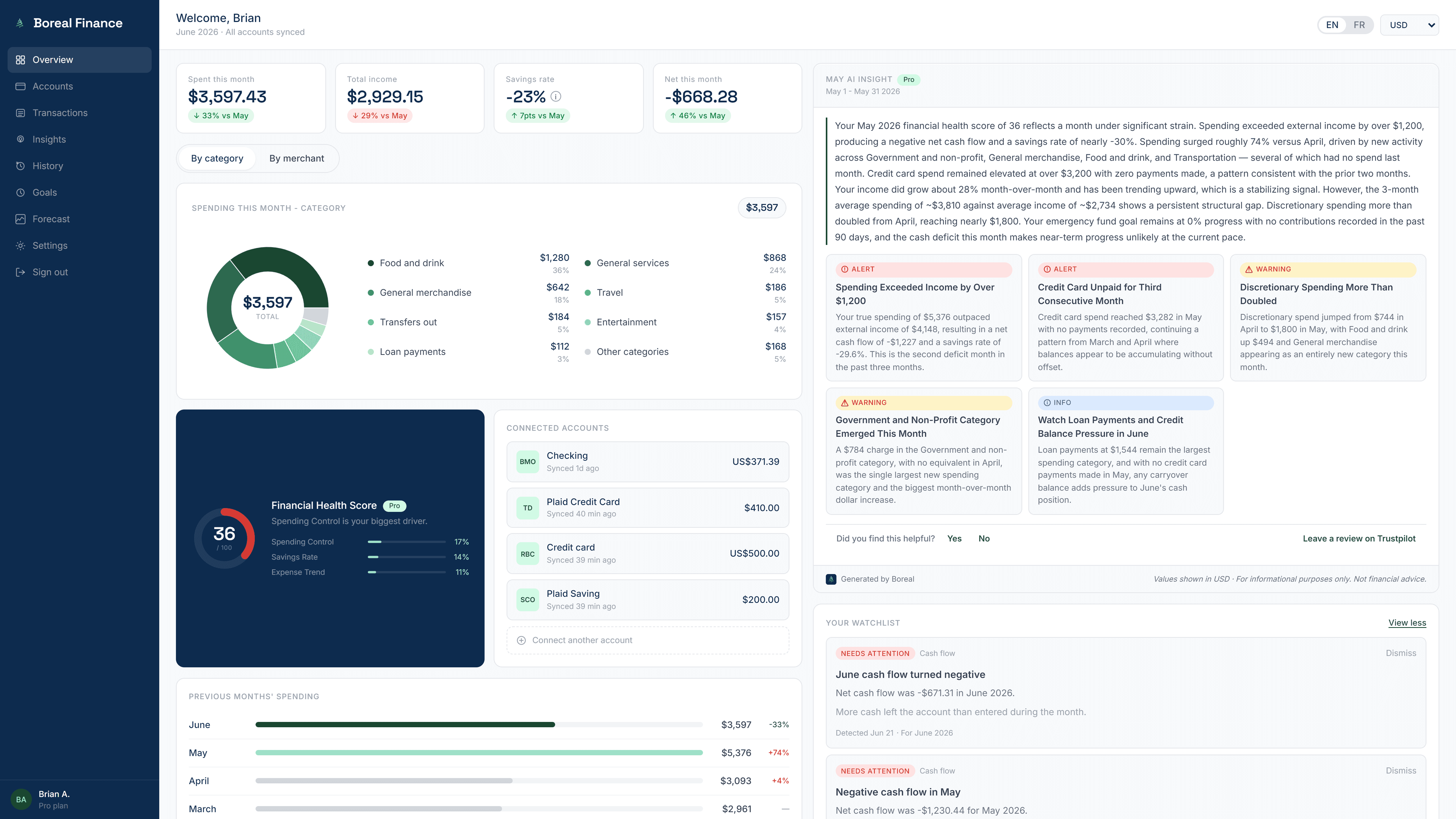
Boreal is built for exactly this problem. You connect your Canadian accounts once — RBC, TD, your credit cards, Wealthsimple, whatever you use — and Boreal securely pulls in your real spending and combines it into one plain-language view. There's no manual categorizing and no spreadsheet to maintain.
Instead of another dashboard to interpret, you get sentences like "dining is up 22% this month" that already account for every connected card and account. The connection is read-only, so Boreal can see your spending but can never move your money, and it never sells your data. See how Boreal works.
Best for: People juggling accounts across several banks who want one honest total — without exporting, re-typing, or babysitting a spreadsheet.
Quick recap
- Multiple accounts make spending hard to total, because no single bank app sees them all.
- Spreadsheets work until they don't — they depend on you doing manual work every month.
- An aggregator combines everything in one place automatically, across banks and cards.
- Do it securely: read-only Plaid connections, no shared banking passwords.
- Boreal does this with no upkeep and tells you what changed in plain language.
The bottom line
You don't need a spreadsheet to track spending across multiple bank accounts in Canada — you need one place that adds it all up for you. Connect your accounts once, let them sync, and let the app surface what actually changed. That's the difference between having your financial data and actually understanding it. If your money lives in five places and your budget lives in none, that's the gap Boreal was built to close.
Frequently asked questions
How do I track spending across multiple bank accounts in Canada?
The easiest way is to use an app that connects to all your accounts and combines them into one view. Instead of checking each bank app separately or maintaining a spreadsheet, you link your accounts once through a secure provider like Plaid, and transactions sync automatically. Apps like Boreal then total your spending by category across every connected bank and card.
Can I see all my bank accounts in one place in Canada?
Yes. A Canadian bank account aggregator connects to multiple banks at once — for example RBC, TD, Wealthsimple, and EQ Bank — and shows your accounts and spending together in a single dashboard. The key is choosing an app that supports your specific banks and connects securely in read-only mode.
Can I combine RBC and TD accounts in one app?
Yes. Apps that connect through Plaid can link accounts from different banks at the same time, so your RBC and TD accounts (and any credit cards) appear in one place. Boreal combines them automatically and adds up your spending across both, instead of leaving you to total them by hand.
Is there an app to track multiple credit cards in Canada?
Yes. The same aggregator apps that combine bank accounts can also track multiple credit cards alongside your chequing and savings. Boreal pulls all your connected cards into one spending view, so you see your real total across every card rather than logging into each card portal separately.
Is it safe to connect several accounts to one app?
It's safe when the app uses a secure, read-only connection through a provider like Plaid and never stores your banking password. A read-only connection can see transactions but cannot move money. Boreal, for example, connects read-only, can't move money, and never sells your data — but avoid any app that asks you to type your banking password directly into it.
Tags
Take control of your money
Boreal turns your accounts into clear, AI-powered insights. Join the early access.
Related posts
How Automatic Transaction Categorization Works — and Why Transfers Get Counted Wrong
Every app that connects to your bank promises to sort your spending for you. Most of them get the ordinary purchases right and then quietly ruin your totals with transfers, credit card payments, refunds, and savings contributions. Here's how automatic categorization actually works, exactly where it breaks, and how to tell whether your numbers can be trusted.
How to Predict Your Bank Balance at the End of the Month
Your balance today doesn't tell you whether you'll make it to payday. Here's how to predict your bank balance at the end of the month using the bills, income and everyday spending you already have — including a simple worked example, and how an app can project your cash and warn you before you dip.
How to Track Your Spending Without Making a Budget
Not everyone wants to build a budget — and you don't have to. If your goal is to understand where your money goes and avoid surprises, here's how to track spending without budgeting: no categories to set up, no transactions to sort, no spreadsheet to babysit.